Managing Microsoft Sentinel table retention and tiers is typically done through scripts or the portal, but neither approach fits well into an infrastructure-as-code workflow and it can be difficult to maintain tables at scale. While exploring the Log Analytics Bicep resource provider, I came across the Microsoft.OperationalInsights/workspaces/tables resource type1, which makes it possible to manage table tier and retention declaratively with Bicep: version-controlled, reviewable, and reproducible across environments.
For each table we typically want to control:
- Table tier: Analytics or Data Lake (Auxiliary)
- Interactive retention: the hot, queryable period
- Total retention: the overall retention period of the table
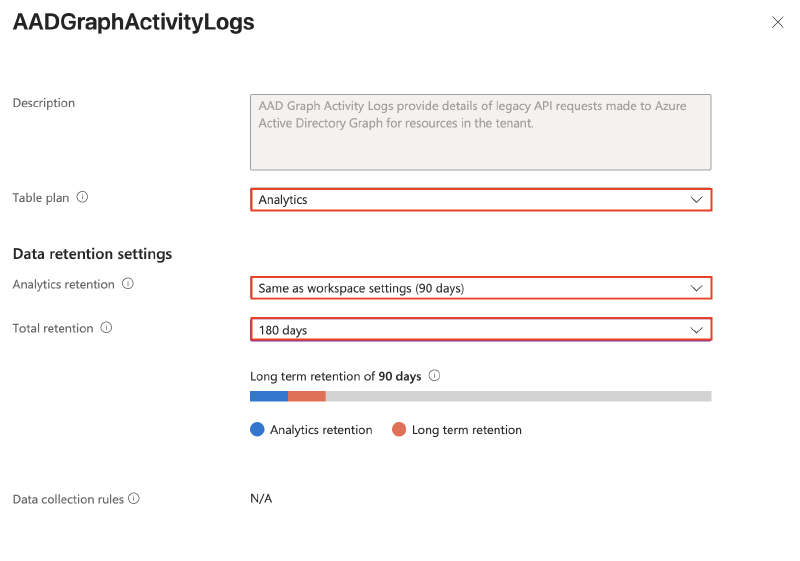
Managing the total retention per table is necessary whenever you want to keep logs longer than the 90-day default to satisfy logging or compliance requirements. Since there is no workspace-level default for total retention, it has to be configured table by table, a perfect fit for a declarative approach.
Identify tables with recent ingestion#
To identify ‘active’ tables, both a KQL- and API-based approach exist.
KQL#
The following KQL query lists tables that have received data in the last 90 days along with their current tier, which is helpful when deciding what to put under Bicep management:
let LookBack = 90d;
let LastTableIngest =
union withsource= _TableName *
| where TimeGenerated > ago(LookBack)
| summarize LastIngestionTime = arg_max(ingestion_time(), TimeGenerated) by _TableName
| extend LastIngestDayDiff = datetime_diff('day', now(), LastIngestionTime)
| project _TableName, LastIngestionTime, LastIngestDayDiff;
Usage
| where TimeGenerated > ago(LookBack)
| project-rename _TableName = DataType, TableTier = Plan
| where isnotempty(TableTier)
| summarize arg_max(TimeGenerated, TableTier) by _TableName
| project _TableName, TableTier
| join kind=fullouter  LastTableIngest on _TableName
| extend TableName = coalesce(_TableName, _TableName1)
| project TableName, TableTier, LastIngestionTime, LastIngestDayDiff
| sort by TableName asc 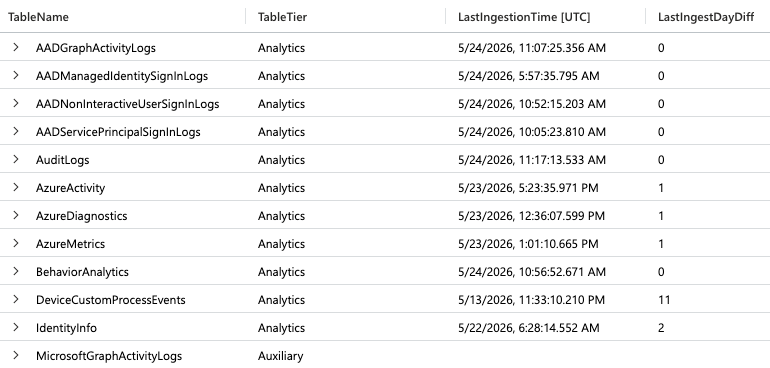
For Auxiliary / Data Lake tables the last ingest is not displayed, as union withsource does not mix Analytics and Auxiliary tables.
PowerShell and ARM API#
The Azure Resource Manager (ARM) API provides a complete list of tables, including default tables. With the snippet below you can directly export the configuration in Bicep format, which will facilitate the next step of declaring the desired retention:
# Snippet to convert Sentinel / Log Analytics table retention settings into a Bicep configuration format
$rg = '<your-resource-group-name>'
$workspace = '<your-workspace-name>'
Connect-AzAccount -Tenant '<your-tenant-id>'

$tableRequest = Invoke-AzRestMethod -Uri ('https://management.azure.com/subscriptions/{0}/resourceGroups/{1}/providers/Microsoft.OperationalInsights/workspaces/{2}/tables?api-version=2025-07-01' -f (Get-AzContext).Subscription.Id, $rg, $workspace)

if ($tableRequest.StatusCode -ne 200) {
    throw "Failed to retrieve tables: $($tableRequest.Content)"
}

$tables = $tableRequest | Select-Object -ExpandProperty Content| ConvertFrom-Json | Select-Object -ExpandProperty value

$bicepConfig = $tables | Where-Object { $_.properties.provisioningState -eq 'Succeeded' } | Sort-Object {$_.name} | ForEach-Object {
    Write-Output ("$($_.name): {
    totalRetentionDays: $($_.properties.totalRetentionInDays)
    retentionInDays: $($_.properties.retentionInDays)
    plan: '$($_.properties.plan)'
}")
}

$bicepConfig | Out-File -FilePath 'bicepTableConfig.txt' -Encoding utf8
example output:
AACAudit: {
    totalRetentionDays: 90
    retentionInDays: 90
    plan: 'Analytics'
}
AACHttpRequest: {
    totalRetentionDays: 90
    retentionInDays: 90
    plan: 'Analytics'
}
AADAgentRiskEvents: {
    totalRetentionDays: 90
    retentionInDays: 90
    plan: 'Analytics'
}Default tables that have never ingested still appear in the list, therefore the ARM export will emit a lot of noise, so you might want to combine this with the KQL approach.
Declaring the Desired Retention#
We can now declare the desired tier and retention per table in Bicep. The example below uses a map structure and covers the common scenarios: workspace-default interactive retention, extended total retention, Auxiliary tier, and a few tables kept fully “hot” for investigations.
For Auxiliary tables the retentionInDays (interactive retention) value is ignored by the resource provider — it always behaves as the minimum interactive retention. Setting it explicitly only matters for Analytics tables.
// Bicep Configuration Example for Sentinel and Log Analytics Tables
@description('The name of the Log Analytics workspace hosting the tables.')
param workspaceName string = 'law-sentinel-chn-prod-01'

@description('Default total retention in days applied to most tables.')
var totalRetentionDays = 180

// Interactive retention for Analytics tables. -1 means inherit the workspace default.
@description('Default interactive retention in days for Analytics tables.')
var retentionInDays = -1

// Per-table retention configuration. Tables used for long-term KPIs and
// investigations get an extended retention period.
var TableRetentionSettings = {
  DeviceInfo: {
    totalRetentionDays: 720
    retentionInDays: retentionInDays
    plan: 'Auxiliary'
  }
  SigninLogs: {
    totalRetentionDays: totalRetentionDays
    retentionInDays: retentionInDays
    plan: 'Analytics'
  }
  UbiquitiLogs_CL: {
    totalRetentionDays: totalRetentionDays
    retentionInDays: retentionInDays
    plan: 'Analytics'
  }
  MicrosoftGraphActivityLogs: {
    totalRetentionDays: totalRetentionDays
    retentionInDays: retentionInDays
    plan: 'Auxiliary'
  }
  // Special config for interactive 'hot' retention
  SecurityAlert: {
    totalRetentionDays: 720
    retentionInDays: 720
    plan: 'Analytics'
  }
  SecurityIncident: {
    totalRetentionDays: 720
    retentionInDays: 720
    plan: 'Analytics'
  }
  AlertEvidence: {
    totalRetentionDays: 720
    retentionInDays: 720
    plan: 'Analytics'
  }
}

resource workspace 'Microsoft.OperationalInsights/workspaces@2025-07-01' existing = {
  name: workspaceName
}

// foreach loop to iterate over all map entries
resource workspaceName_table 'Microsoft.OperationalInsights/workspaces/tables@2025-07-01' = [
  for table in items(TableRetentionSettings): {
    parent: workspace
    name: table.key
    properties: {
      plan: table.value.plan
      totalRetentionInDays: table.value.totalRetentionDays
      retentionInDays: table.value.retentionInDays
    }
  }
]
Now we can deploy the template with the Azure CLI towards our Sentinel Resource Group:
az deployment group create \
  --resource-group 'rg-siem-chn-prod-01' \
--template-file 'TableRetention.bicep'- Some Microsoft-managed tables reject plan changes.
- Long-term retention beyond 90 days is billed for Analytics tables2.
- Use
az deployment group what-ifto preview changes before applying.
Why this matters#
Managing table tier and retention through Bicep keeps the configuration version-controlled, reviewable, and reproducible across environments. A much cleaner process than ad-hoc scripts or portal clicks. In more mature Bicep environments, the retention map can also be declared into a separate parameters file to keep the template itself minimal.
It is also worth noting that Microsoft has softened the guidance shown in the Azure portal. Earlier wording strongly steered users toward managing tables in Defender XDR once the data lake was enabled; the current hint is more permissive:

Microsoft learn - Microsoft.OperationalInsights/workspaces/tables (https://learn.microsoft.com/en-us/azure/templates/microsoft.operationalinsights/workspaces/tables?pivots=deployment-language-bicep) ↩︎
Microsoft learn - Sentinel Interactive and total data retention costs (https://learn.microsoft.com/en-us/azure/sentinel/billing?tabs=simplified%2Ccommitment-tiers#interactive-and-total-data-retention-costs) ↩︎