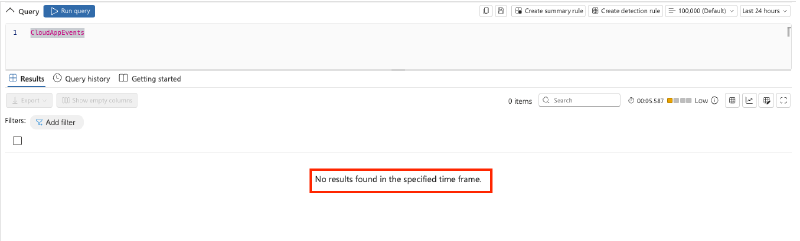
During a recent engagement I stumbled across an interesting observation: the Defender for Cloud Apps advanced hunting table CloudAppEvents was empty, even though the tenant had adopted Microsoft 365 collaboration and security tooling.
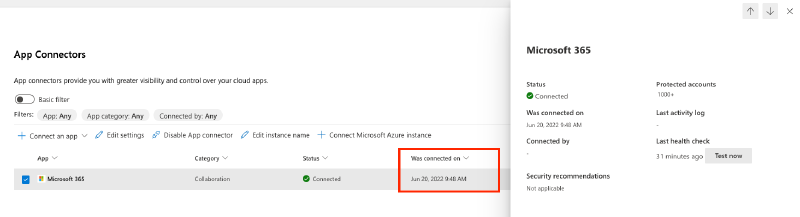
The Microsoft 365 app connector was reported as healthy, with the initial connection dating back to 2022:
However, when opening the connector, none of the Microsoft 365 components were actually selected:
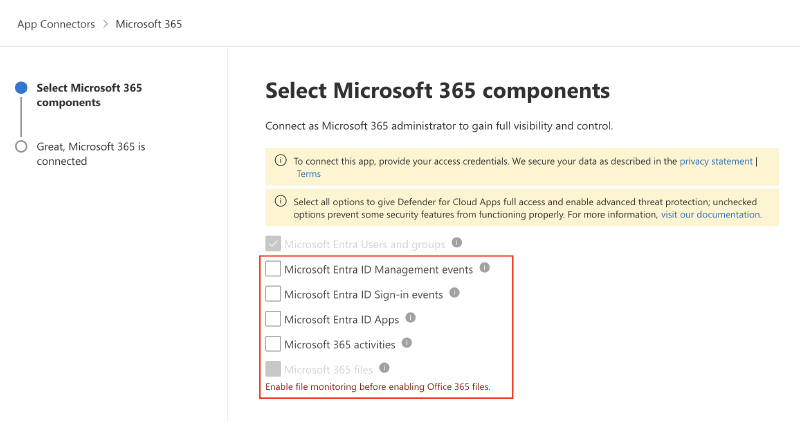
So either someone forgot to tick the boxes back in 2022, or Microsoft used different auto-provisioning defaults at the time.
This is also called out in the Microsoft docs 1:
In January 2026, the default values were added to support complete security coverage. If you configured your application before January 2026, make sure you select all of the default options and select Connect again to update your configuration.1
For maximum protection, we recommend selecting all Microsoft 365 components. Some threat detection and response functionalities don’t work unless all required components are properly selected.1
Interestingly, on another, more recently onboarded tenant where the connector had never been modified, all boxes were ticked except for file monitoring.
So now is a good time to revisit your Defender for Cloud Apps connector in the Defender XDR Portal under Settings > Cloud Apps > Connected apps > App Connectors and make sure all the boxes are ticked:
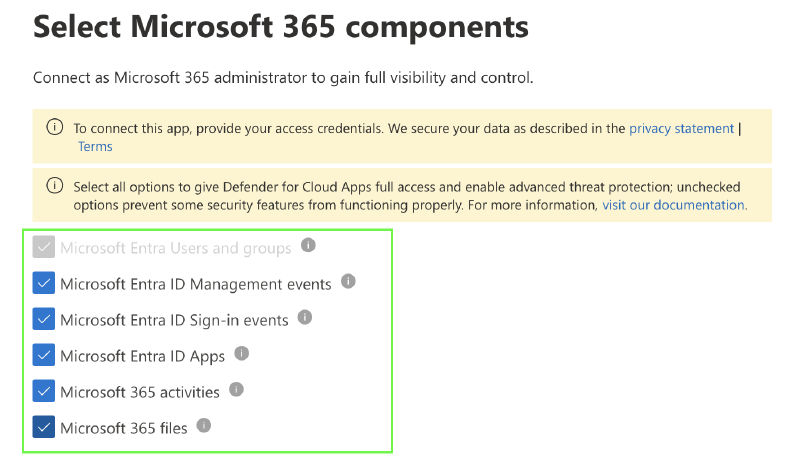
A quick check that takes only a minute, but can make the difference between blind spots and full visibility across your Microsoft 365 estate.
Microsoft Learn - How Defender for Cloud Apps helps protect your Microsoft 365 environment (https://learn.microsoft.com/en-us/defender-cloud-apps/protect-office-365) ↩︎ ↩︎ ↩︎