If you’ve been in the Defender XDR portal, you might have noticed some new badges and banners hinting that Microsoft Defender now comes with native case management. A portal banner announces the move to cases for incident response:

The feature was also part of the ISOC announcement and is now rolling out in public preview to Defender customers. Microsoft also published a message center post:
Microsoft Defender is introducing native Case Management to help security teams investigate and resolve threats faster while reducing tool sprawl. MC1477993
Sometimes SOC teams handle incidents in Defender but track the actual work, such as ownership, tasks, SLAs and handover notes, in separate tools. These can be ticketing systems or sometimes even Jira, while other teams use dedicated SOAR solutions. Many of those also have a sunset date, like Palo Alto XSOAR in 2029 1. So Microsoft keeps up the pace and adds incident management capabilities under the name of cases. Cases aim to bring work back from external tools directly into the Defender portal.
Case types#
Case management currently supports two case types:
- Incident cases (preview): Created by the service from correlated incident activity. During this phase, each incident case maps one-to-one to an incident.2
- Generic cases: Created manually to track SecOps work outside the incident workflow, for example, a threat hunt, a hardening follow-up or an audit request.
Microsoft recommends incident cases as the new experience for managing incidents. The legacy incident experience remains available during the preview.3
Portal#
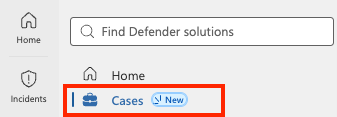
Cases are located under Cases in the Defender portal navigation, split into Incident and Generic case types:
Incident cases keep the investigation context you know from incidents: attack story, alerts, assets, investigations, evidence and response actions. Existing unified RBAC permissions related to incidents also apply to cases. Workbooks, automation, playbooks and integrations built on incidents continue to work.
Changes to the owner, status, tags and classification on the case are synced to the related incident. One detail to keep in mind: resolving an incident case doesn’t resolve its alerts. They keep their own status.
Additional capabilities#
Compared to incidents, cases add the following capabilities. You can configure them per case type under Cases > Case management settings:
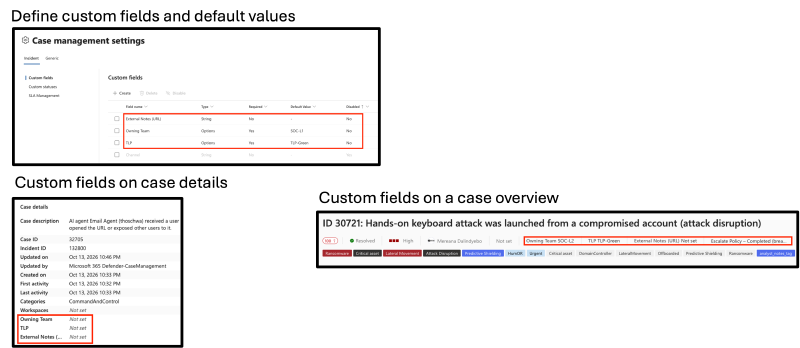
Custom fields#
Custom fields can be used to store organization-specific information, such as the affected business unit or an external reference. Fields can be required and have a default value.4 Custom fields appear in case management settings, the case header and case details:
Custom statuses#
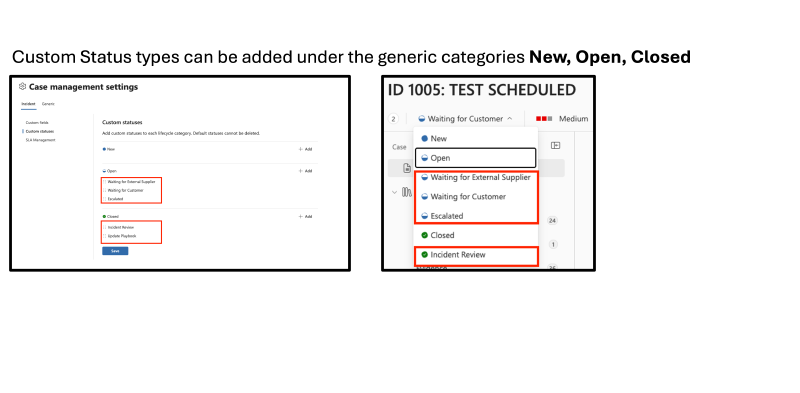
Add your own statuses, such as “Waiting for user” or “Pending remediation”, under the lifecycle categories New, Open and Closed. Default statuses can’t be deleted.4 Custom statuses appear in case management settings and the case status menu:
SLA tracking#
Define when a timer starts, pauses and stops, with durations based on severity, source, owner or custom fields. You can filter the queue by SLA state and send notifications through automation rules.5 SLA policy settings control tracking in the case queue and case details:
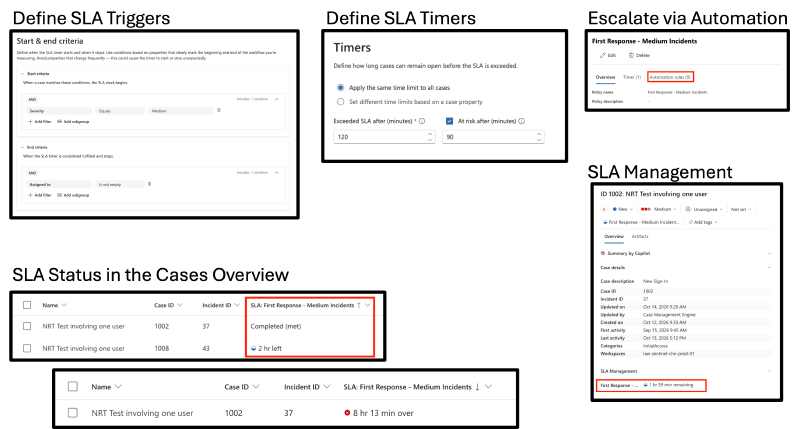
It will also be possible to escalate SLA breaches via automation rules.
Comments, tasks and file uploads#
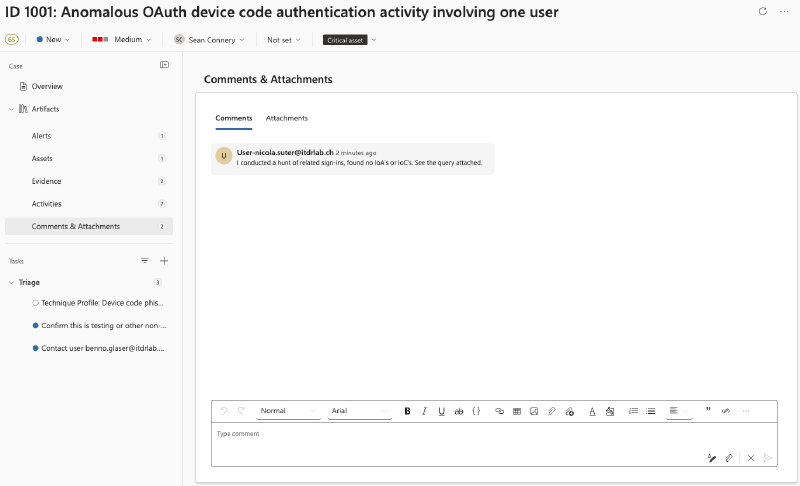
Attach files to comments or upload them on the Attachments tab, for example, a forensic report, queries or screenshots from a user.6
Personally, I enjoy the tidy look and extra space compared to the incident comments.
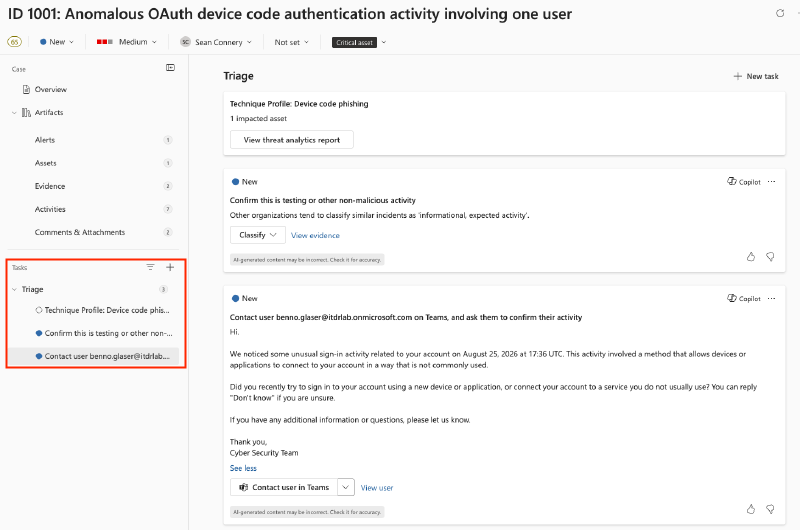
Furthermore, Security Copilot automatically suggests tasks, or you can add your own:
Advanced Hunting#
Every change to cases, tasks, comments, attachments and relations is written to the SecurityCaseEvent advanced hunting table.
To see cases that were processed by the Defender XDR incident correlation engine, you can use the following query:
SecurityCaseEvent
| where OperationName has_any ("Create", "Update")
| where ModifiedBy == "Microsoft 365 Defender-IncidentCreation"
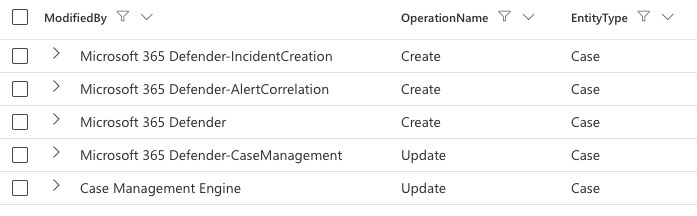
Interestingly, a lot of Defender components are recorded as creating or updating cases:
SecurityCaseEvent
| where ModifiedBy has_any ("Microsoft 365 Defender", "Case")
| distinct  ModifiedBy, OperationName, EntityType
| sort by OperationName asc
For auditing status changes on cases, the table schema isn’t particularly friendly: a case audit record stores modified property names and values in separate (hopefully) ordered lists:
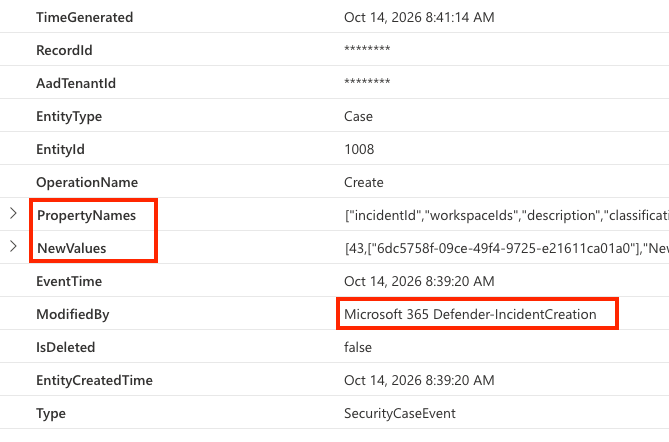
With some make_bag magic, we can restore a readable format:
SecurityCaseEvent
// Normalize ordered lists with keys and values into bags
| mv-apply
    _Key = PropertyNames to typeof(string),
    _NewValue = NewValues to typeof(string),
    _OldValue = PreviousValues to typeof(string) on (
    summarize
        NewValue = make_bag(bag_pack(_Key, _NewValue)),
        OldValue = make_bag(bag_pack(_Key, _OldValue))
    )
| project-away PropertyNames, NewValues, PreviousValuesYou can use the | evaluate bag_unpack() plugin 7 on the NewValue and OldValue columns to extract all values from the dynamic property bags.
API#
Cases are also available in Microsoft Graph (beta) under /security/caseManagement/cases. The required permissions are CaseManagement.Read.All to query and CaseManagement.ReadWrite.All to modify cases.8
Connect-MgGraph -Scopes 'CaseManagement.Read.All'

Invoke-MgGraphRequest -Method GET -Uri 'beta/security/caseManagement/cases' -OutputType PSObject `
  | Select-Object -ExpandProperty value
You can create generic cases through the API, but not incident cases. Those are created by the service only.
Connect-MgGraph -Scopes 'CaseManagement.ReadWrite.All'

$case = @{
  '@odata.type' = '#microsoft.graph.security.caseManagement.genericCase'
  'displayName' = 'Test Case via API'
  'Description' = 'Cases API Test'
  'status' = 'New'
}
Invoke-MgGraphRequest -Method POST -Uri 'beta/security/caseManagement/cases' -Body $case
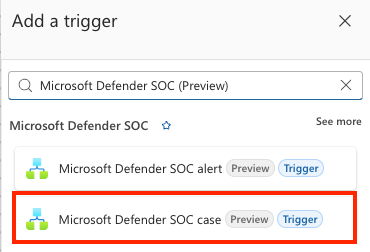
For low-code automation, the new Microsoft Defender SOC (Preview) Logic Apps connector9 triggers when a case is created or updated. The Microsoft Defender SOC case trigger is available in Logic Apps:
Conclusion#
In my view, cases are a big step for SOC teams that already work in Defender. During the preview, I’m longing for features such as file previews and multi-tenant capabilities so MSSPs can make greater use of native capabilities such as SLA tracking.

Palo Alto Networks - Cortex XSOAR end-of-life summary ↩︎
Message Center (MC1477993) - Case management in Microsoft Defender ↩︎
Microsoft Learn - Case management in the Microsoft Defender portal ↩︎
Microsoft Learn - Configure case templates in the Microsoft Defender portal ↩︎ ↩︎
Microsoft Learn - SLA policies for cases in the Microsoft Defender portal ↩︎
Microsoft Learn - Manage incident cases in the Microsoft Defender portal ↩︎
Microsoft Learn - Kusto bag_unpack plugin ↩︎
Microsoft Learn - Get task (Microsoft Graph beta) ↩︎
Microsoft Learn - Microsoft Defender SOC (Preview) connector ↩︎