Dangling DNS records and OIDC redirect URIs are well-known, actively exploited security misconfigurations. While federated identity credentials reduce the risks of token exposure and leaked secrets, they can leave dangling trust relationships too.
Federated credentials are usually tied to two important token claims: iss (issuer) and sub (subject). For federated credentials in GitHub Actions pipelines, the GitHub IdP issues tokens with the following claims (truncated):
{
  "payload": {
    "aud": "api://AzureADTokenExchange",
    "iss": "https://token.actions.githubusercontent.com",
    "ref": "refs/heads/main",
    "repository": "nicolonsky/ITDR",
    "repository_id": "715070358",
    "repository_owner": "nicolonsky",
    "repository_owner_id": "32899754",
    "sub": "repo:nicolonsky/ITDR:ref:refs/heads/main"
  }
}
Regardless of whether your repository belongs to an individual or an organization, the owner and repository names are constructed from your username or organization name.
Get a GitHub Action OIDC token
In a JavaScript GitHub Action, @actions/core provides getIDToken to request a JWT from GitHub’s OIDC provider.
You can then acquire a token with const token = await core.getIDToken(audience);.
See the OIDC token documentation for @actions/core for the full example.
The GitHub Actions workflow also needs the following permission:
permissions:
  id-token: write # required to request the OIDC token
Threat modelling#
For a federated credential that still trusts a name-based subject, a plausible attack sequence is:
- Enumerate Entra app registrations and their federated credentials to identify trusted external subjects.
- Find a credential that still trusts a repository that no longer exists and check whether its name can be reclaimed.
- Recreate the repository under the declared owner in the subject. If that owner is an existing GitHub organization, the attacker needs permission to create repositories in that organization.
- Create a GitHub Actions workflow in the repository and use the existing trust to authenticate as the application.
Two relevant MITRE ATT&CK mappings for the ‘Initial Access’ tactic are:
- Trusted Relationship (T1199): abusing the trust granted to an external workload to gain access. 1
- Valid Accounts - Cloud Accounts (T1078.004): using the trusted workload identity to access resources as the application. 2
Microsoft calls this subject recycling. Dangling credentials are especially exposed: they remain configured long after the workload they were created for is gone. 3
What changed#
To mitigate dangling federated credentials, both GitHub and Microsoft have switched to immutable subjects:
For repositories created or renamed after July 15, 2026, GitHub uses immutable subject claims by default.4
You can also enable immutable claims for existing repositories:
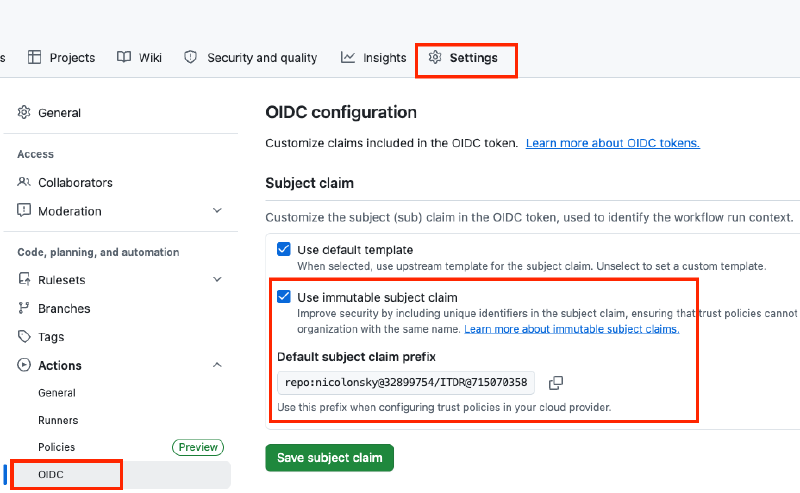
You can enable immutable subject identifiers in the GitHub repository settings under Actions / OIDC.
Microsoft also changed the default in Entra ID for new federated credentials. 5 The updated flow requires you to provide the federated credential details when creating a new credential.
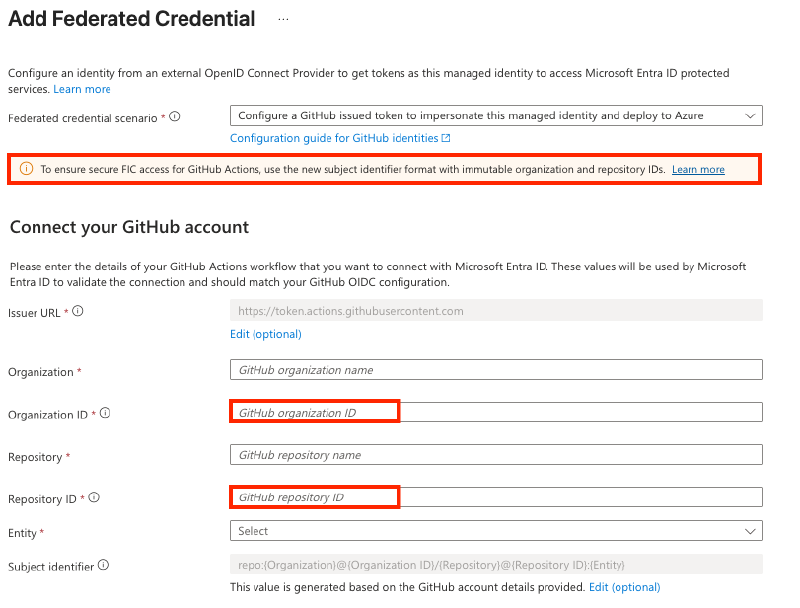
When adding federated credentials to an app registration in Entra ID, you need to enter the immutable owner and repository IDs.
Here is an example of how GitHub Actions builds an immutable subject:
-"sub": "repo:nicolonsky/ITDR:ref:refs/heads/main"
+"sub": "repo:nicolonsky@32899754/ITDR@715070358:ref:refs/heads/main"
For GitLab CI pipelines, you can also use an immutable subject. To enable it, configure the option on the project via the API. 6
Discovering non-immutable subject identifiers#
The new defaults don’t remediate existing credentials. The Entra ID changes apply to newly created federated credentials; existing subject-name-based credentials and the apps that trust them may still be vulnerable to subject recycling.
PowerShell#
You can use the following PowerShell snippet to scan your Entra ID tenant for vulnerable federated credentials from GitHub and GitLab.

Connect-MgGraph -Scopes "Application.Read.All" -NoWelcome

$verbosePreference = "Continue"
$nonImmutableFic = [system.collections.generic.list[psobject]]::new()

$apps = Invoke-MgGraphRequest -Method GET -Uri "beta/applications" -OutputType PSObject | Select-Object -ExpandProperty value
foreach ($app in $apps) {
    Write-Verbose "Checking federated credentials for application: $($app.displayName) ($($app.id))"
    $federatedCredentials = Invoke-MgGraphRequest -Method GET -Uri "beta/applications/$($app.id)/federatedIdentityCredentials" -OutputType PSObject | Select-Object -ExpandProperty value
    foreach ($cred in $federatedCredentials) {
        switch -Regex ($cred.issuer) {
            'token.actions.githubusercontent.com' {
                Write-Verbose "Found federated credential with GitHub Actions issuer: $($cred.name)"
                if ($cred.subject -notmatch '^repo:[^@/:\s]+@[0-9]+/[^@/:\s]+@[0-9]+:') {
                    Write-Warning "Federated credential subject does not contain immutable identifiers: $($cred.subject)"
                    $nonImmutableFic.Add(
                        [pscustomobject]@{
                            AppId = $app.id
                            AppDisplayName = $app.displayName
                            CredentialName = $cred.name
                            CredentialSubject = $cred.subject
                        }
                    )
                }
                else {
                    Write-Verbose "Federated credential subject contains immutable identifiers: $($cred.subject)"
                }
                break
            }
            'gitlab' {
                Write-Verbose "Found federated credential with GitLab issuer: $($cred.name)"
                if ($cred.subject -notmatch 'project_id:') {
                    Write-Warning "Federated credential subject does not contain immutable identifiers: $($cred.subject)"
                     $nonImmutableFic.Add(
                        [pscustomobject]@{
                            AppId = $app.id
                            AppDisplayName = $app.displayName
                            CredentialName = $cred.name
                            CredentialSubject = $cred.subject
                        }
                    )
                }
                else {
                    Write-Verbose "Federated credential subject contains immutable identifiers: $($cred.subject)"
                }
                break
            }
            default {
                Write-Verbose "Found federated credential with issuer: $($cred.name) ($($cred.issuer))"
                break
            }
        }
    }
}

Write-Output "Scanned $($apps.Count) applications for non-immutable federated identity credentials"
Write-Output "Total non-immutable federated identity credentials found: $($nonImmutableFic.Count)"

Write-Output "Non-immutable federated identity credentials details:"
$nonImmutableFic | Format-Table -AutoSizeMaester#
For continuous security testing, I also created a Maester test to identify GitHub and GitLab federated identity credentials that still use mutable subjects.
Coming soon (PR in review)- Test ID:
MT.1226: GitHub and GitLab federated identity credentials should use immutable subject identifiers.
Remediation action#
For each reported federated credential, the following high-level steps apply:
- Confirm that the trusted repository or project still exists and requires access. Delete credentials for workloads that are no longer used.
- For GitHub Actions, create a credential matching the immutable owner and repository IDs, then enable immutable subjects in the repository or organization OIDC settings.
- For GitLab, configure
ci_id_token_sub_claim_componentsto useproject_idinstead ofproject_path, and update the federated credential to match. - Validate pipeline authentication before removing the old name-based credential.
Recap#
Immutable subjects aren’t supported for every workload, but they offer significant benefits, especially if your organization uses GitHub. I’d recommend adopting them for existing federated credentials wherever supported, rather than relying on the defaults for new ones.
MITRE ATT&CK - Trusted Relationship (T1199) ↩︎
MITRE ATT&CK - Valid Accounts: Cloud Accounts (T1078.004) ↩︎
Microsoft Learn - Mutable subjects in federated identity credentials ↩︎
GitHub - Actions Security OIDC claims ↩︎
GitLab - Use the project ID as the subject ↩︎