Enhanced Filtering for Connectors1 (aka skip listing) lets Exchange Online and Defender for Office 365 see the actual sender IP address instead of only the last hop. This is required so that MDO can verify message authentication attributes such as SPF, DMARC, and DKIM. Microsoft recommends it in its guides for third party mail flows2 3 to get the full value out of MDO.
Without enhanced filtering, MDO only sees your 3rd party gateway as the sender for incoming e-mails. As a result, you lose important sender metadata, which degrades your experience in Threat Explorer, Advanced Hunting, and the Tenant Allow/Block List.
The mail flow in the environment roughly looks like this, with the 3rd party gateway acting as the MX for inbound mail and as the smart host for outbound mail. Exchange Online is connected to an on-premises Exchange server via the hybrid connector:
flowchart LR
    Internet([Internet])
    Gateway[3rd Party
Mail Gateway
MX record]
    EXO[Exchange Online
Defender for Office 365]
    OnPrem[On-Premises
Exchange Server]

    %% Inbound flow
    Internet --> Gateway
    Gateway -- "Partner connector
+ Enhanced Filtering" --> EXO
    EXO -- "Hybrid connector" --> OnPrem

    %% Outbound flow
    OnPrem -. "Hybrid connector
+ Enhanced Filtering" .-> EXO
    EXO -. "Partner connector" .-> Gateway
    Gateway .-> Internet

    classDef cloud fill:#e6f2ff,stroke:#0078d4,color:#000
    classDef onprem fill:#fff4e6,stroke:#d97706,color:#000
    classDef gw fill:#f3e8ff,stroke:#7c3aed,color:#000
    class EXO cloud
    class OnPrem onprem
    class Gateway gw
Following the Microsoft recommendation, enhanced filtering was enabled on both the 3rd party connector and the Exchange hybrid connectors.
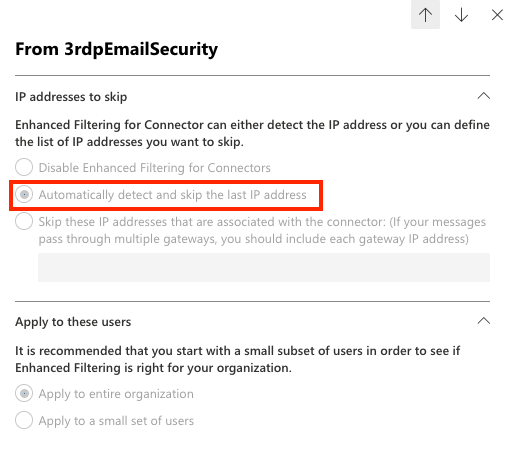
After a few cloud minutes, the original sender IP addresses showed up in MDO and the X-MS-Exchange-SkipListedInternetSender header was added to inbound e-mails.
Enabling skip listing for only a subset of users can also help to detect issues early, but this requires a representative set of test users; otherwise, issues might go unnoticed.
Gotcha#
A few hours later, I noticed a spike of blocked e-mails in quarantine. The cause: external systems were sending e-mails through the 3rd party gateway using internal sender domains that were not in the SPF record.
The problematic flow looks like this: external systems (e.g. SaaS apps, marketing tools, partner systems) send e-mails to internal recipients via the 3rd party gateway, using an internal sender domain ([email protected]). Before skip listing, MDO only saw the gateway IP, which is SPF authorized, so SPF passed. With skip listing enabled, MDO now sees the original sending IP, which is not in the SPF record, so SPF fails:
flowchart LR
    ExtSys[External System
Sends as [email protected]
IP not in SPF]
    Gateway[3rd Party
Mail Gateway
MX record]
    EXO[Exchange Online
Defender for Office 365
SPF check fails]
    Quarantine[Quarantined]

    ExtSys -->|"Direct submission"| Gateway
    Gateway -- "Partner connector
+ Enhanced Filtering
exposes original IP" --> EXO
    EXO --> Quarantine

    classDef cloud fill:#e6f2ff,stroke:#0078d4,color:#000
    classDef gw fill:#f3e8ff,stroke:#7c3aed,color:#000
    classDef ext fill:#fee2e2,stroke:#dc2626,color:#000
    class EXO cloud
    class Gateway gw
    class ExtSys ext
Impact Analysis#
After enabling skip listing, blocked e-mail volume in Defender for Office 365 jumped noticeably:

To quantify the impact and find the affected senders, the KQL query below joins blocked SPF failures against e-mails that were previously delivered through the 3rd party gateway. The result is a list of senders that started failing SPF only because skip listing exposed their original IP. Replace 154.XX.XX.XX with the public IPv4 address of your gateway:
let MailGateways = dynamic("154.XX.XX.XX");
let Delivered = EmailEvents
    | where TimeGenerated > ago(30d)
    | where EmailDirection == "Inbound"
    | where DeliveryAction == "Delivered"
    | where SenderIPv4 in (MailGateways)
    | distinct SenderFromAddress, SenderIPv4, SenderIPv6;
EmailEvents
| where TimeGenerated > ago(14d)
| where DeliveryAction == "Blocked"
| extend AuthenticationDetails = parse_json(AuthenticationDetails)
| evaluate bag_unpack(AuthenticationDetails)
| where SPF == "fail"
| join kind=inner Delivered on SenderFromAddress
| project-rename PreSkipListingIP = SenderIPv41, SkipListingIP = SenderIPv4
| where PreSkipListingIP != SkipListingIP
| summarize BlockedCount = count()
    by
    SenderFromAddress,
    SPF,
    DMARC,
    DKIM,
    PreSkipListingIP,
    SkipListingIP
| where BlockedCount > 10Mitigation#
When checking the affected mail authentication details, the sender IPv4 address was missing from the SPF record, which led to spoofed verdicts. To mitigate this, add the public IPv4 addresses of those systems to the Tenant Allow/Block List:
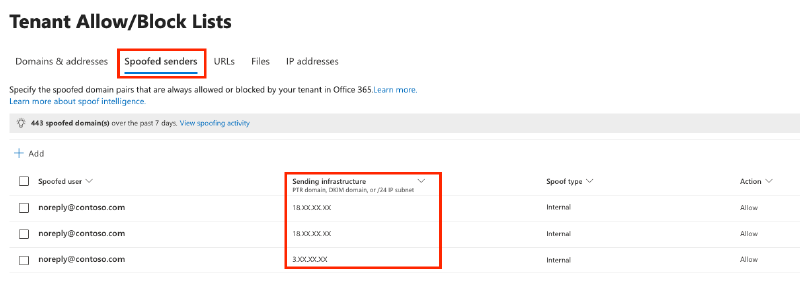
Although the docs and UX suggest that you can only add a PTR domain, DKIM domain, or /24 IP subnet, you can add individual IPv4 addresses just fine.
What I learned#
Before enabling skip listing, run the KQL query below to find senders using your own domains for inbound mail flow. If any of those sender IPs are not in your SPF record, fix them first to avoid a flood of SPF failures after the change:
// Identify any senders using your domain inbound, e.g. no intra-org flow, to detect potential issues with skip listing
let YourDomains = pack_array("contoso.com");
EmailEvents
| where EmailDirection == "Inbound"
| where DeliveryAction == "Delivered"
| where SenderFromDomain in (YourDomains)
| summarize count() by SenderFromAddress, SenderIPv4
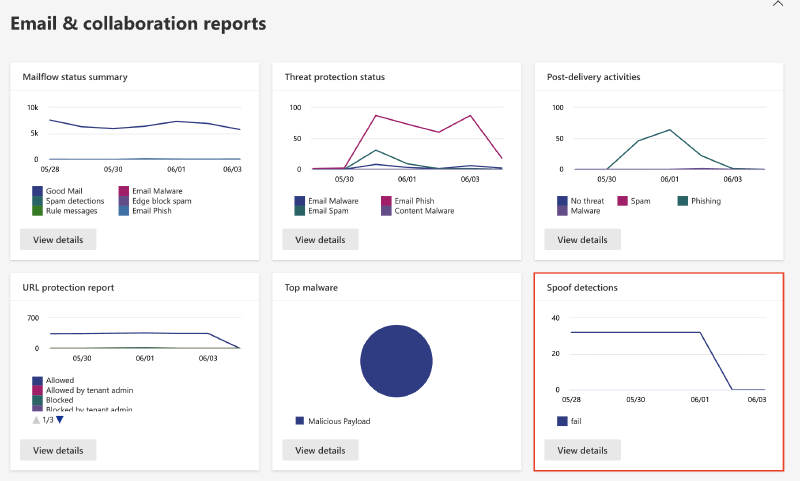
The built-in Spoof detections report is also useful for an ongoing view: Defender XDR > Reports > Email & collaboration reports > Spoof detections.
Microsoft Learn - Enhanced Filtering for Connectors in Exchange Online (https://learn.microsoft.com/en-us/exchange/mail-flow-best-practices/use-connectors-to-configure-mail-flow/enhanced-filtering-for-connectors) ↩︎
Microsoft Learn - Manage mail flow using a third-party cloud service with Exchange Online (https://learn.microsoft.com/en-us/exchange/mail-flow-best-practices/manage-mail-flow-using-third-party-cloud) ↩︎
Microsoft Learn - Getting the best security value from Microsoft Defender for Office 365 when you have non-Microsoft email filtering (https://learn.microsoft.com/en-us/defender-office-365/step-by-step-guides/defense-in-depth-guide) ↩︎